SaaS landing page example: shift-scheduling software for restaurants
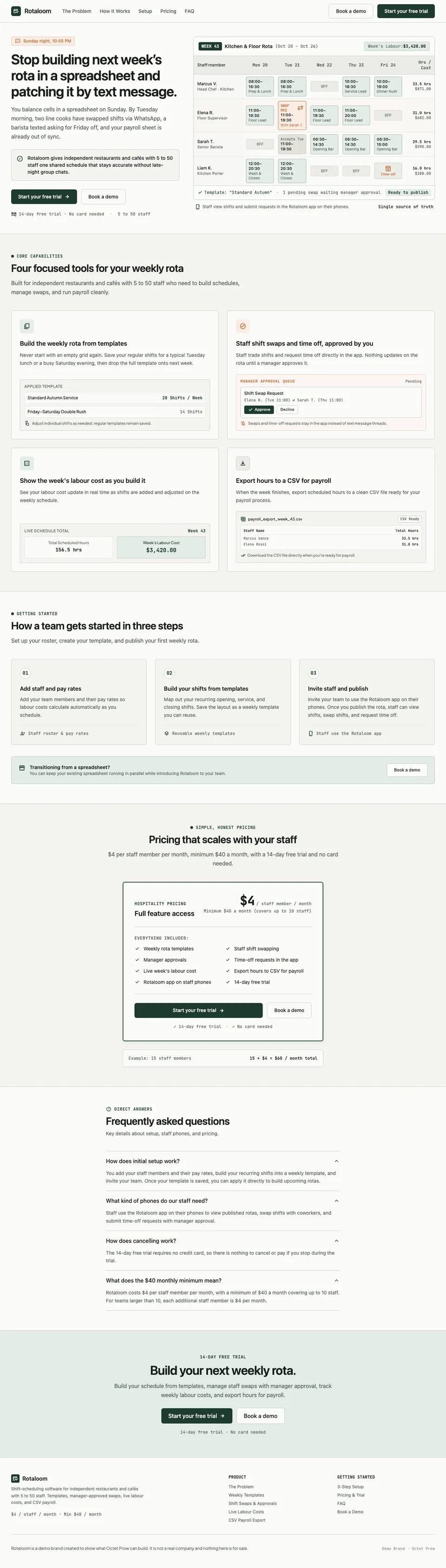
A landing page for Rotaloom, fictional rota software for restaurants and cafés. It opens on the problem beside a drawn weekly rota, then shows four features, three setup steps, per-staff pricing and four questions, with a free trial and a demo as the two actions.
- Page type
- Product page
- Canvas
- Desktop · 1280 px
- Sections
- 6
- Brand
- Rotaloom (demo brand)
Download and usage details
- Files
- HTML + CSS · images included
- Usage
- Free to edit and use in personal and commercial projects. Attribution is optional. Do not resell or redistribute the templates themselves as templates.
- Forms, if included
- They look complete but do not send anything. Point the form at your own form service or email tool before you publish.
- Fonts
- Fonts load from Google Fonts
- Demo content
- Every brand is a fictional demo brand, and the copy was written for that demo. Replace product facts, offers and any testimonials with your own, and check every claim before you publish.
What we typed
A SaaS landing page for Rotaloom. Lead with the problem: building next week's rota in a spreadsheet and then fixing it by text message. Show what Rotaloom does: build the weekly rota from templates, let staff swap shifts and request time off in the app with manager approval, show the week's labour cost as you build it, and export hours to a CSV for payroll. Include a short section on how a team gets started in three steps. Pricing: $4 per staff member per month, minimum $40 a month, with a 14-day free trial and no card needed. Answer a few questions about setup time, staff phones and cancelling. Main action: Start your free trial; secondary action: Book a demo. Do not invent customer logos, customer counts, reviews, ratings or time-saved figures. In the footer, add one line: Rotaloom is a demo brand created to show what Octet Prow can build. It is not a real company and nothing here is for sale.
Rotaloom Workline
- primary · #1E3A2F
- secondary · #C26D38
- surface · #FBFBF9
- outline · #C8CDC7
- inverse · #1A1E1C
- Sans · Plus Jakarta Sans
- Mono · JetBrains Mono
Generated once for the project from its brief. Every page in the project follows it.
How the page is put together
- OpeningStop building next week’s rota in a spreadsheet and patching it by text message.The problem in one sentence, a drawn weekly rota with costs and a swap request, and both actions.
- 01Four focused tools for your weekly rotaTemplates, swaps and time off, labour cost and the CSV export, each with a drawn product view.
- 02How a team gets started in three stepsStaff and pay rates, templates, then invite and publish.
- 03Pricing that scales with your staffOne plan card, the $40 minimum and a worked example for 15 staff.
- 04Frequently asked questionsSetup, staff phones, cancelling and the minimum.
- 05Build your next weekly rota.A closing band with both actions.
What we checked and changed
This page needed the most changes of the four. Our brief asked for answers about setup time and staff phones without giving them, and the model supplied its own: two hours, under 20 minutes, a 15-minute setup, minutes per step; iOS, Android and web access, sign-in from a phone browser, rotas and invites by SMS, no password and no install. We removed all of them, along with a labour-cost percentage and budget cap, pasting from a spreadsheet, salaried staff, role categories in the CSV, billing only for staff on the rota, no setup fee, one-click cancelling, annual contracts and a closing promise not to charge if it did not fix the problem. Without the invented details, the staff-phones answer only says staff use the Rotaloom app; we left it short rather than make something up. The rota, swap and CSV views are drawn in HTML with sample names and figures. We linked the wordmark to the top of the page before publishing.