A template is an outline, not only a layout
Most landing page templates you can download are layouts: a hero, three columns of features, a testimonial strip. A layout tells you where things go but not what to say, so pages built from one often look finished and still leave the visitor’s questions unanswered.
The templates below are content outlines: the blocks a visitor needs, in the order they need them, with what to write in each. Lay them out in your brand’s colours and type afterwards — see how to keep landing pages on brand. The filled-in examples are also free HTML templates you can download and edit.
What to prepare first
- Who arrives and from where: the ad, email or post that sends the traffic, and what it promised.
- The one action: buy, start a trial, book, sign up — and the one page or form it leads to.
- Facts you can stand behind: price, what is included, sizes or plans, delivery, trial and return terms.
- The questions people ask before buying, from sales emails, support tickets or reviews of similar products.
- Real proof, if you have it: reviews or customer names you are allowed to use. If you do not have any, leave that block out rather than inventing it.
Product landing page template
| Block | What it does | Fill in |
|---|---|---|
| 1. Headline and first screen | Says what it is and who it is for | “[Problem it solves]” or “[Product] for [who]” · one product photo · price and the main button |
| 2. How it works | Shows the product in use | Three short steps or a routine: “[Step], [step], [step].” |
| 3. What is in it | Gives the reasons behind the claims | Materials, ingredients or components, each with one line on why it is there |
| 4. Who it suits, and who it does not | Helps the right buyer recognise themselves | “Good for [who / what]. Not for [who / what].” |
| 5. Options and what arrives | Removes the last practical questions | Sizes, colours or bundles · what is in the box · delivery and returns |
| 6. Doubts | Answers what stops people buying | Three or four short questions: fit or compatibility, care, what if it does not work |
| 7. Offer and action | Repeats the offer once more | “[Product], [price]. [Shipping or guarantee].” · the same button as block 1 |
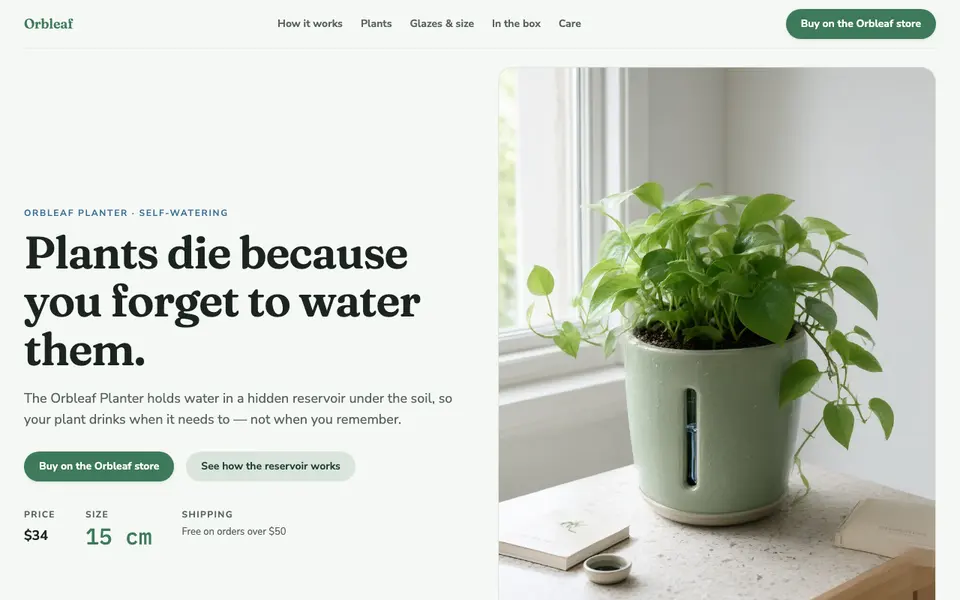
Before launch, run the finished page through the product page checklist.
SaaS and offer landing page template
For software, services and time-limited offers, the visitor needs to know what the offer is before what the product does. The order changes accordingly:
| Block | What it does | Fill in |
|---|---|---|
| 1. Offer and who it is for | Tells the visitor in one line why they are here | “[Offer] for [who].” · the main button, e.g. start a free trial |
| 2. What it does | Explains the product in a few concrete jobs | Three things it does, each in one line, in the user’s words |
| 3. Use cases | Lets different visitors see themselves | Two or three short scenarios: “If you are [who], you use it to [job].” |
| 4. How the offer works | States the terms plainly | Normal price and offer price · who qualifies and until when · trial and what happens after it |
| 5. FAQ | Answers the questions people ask before signing up | Switching plans, renewal price, cancelling, data and integrations |
| 6. Closing action | Repeats the one action | A short line that restates the offer · the same button as block 1 |
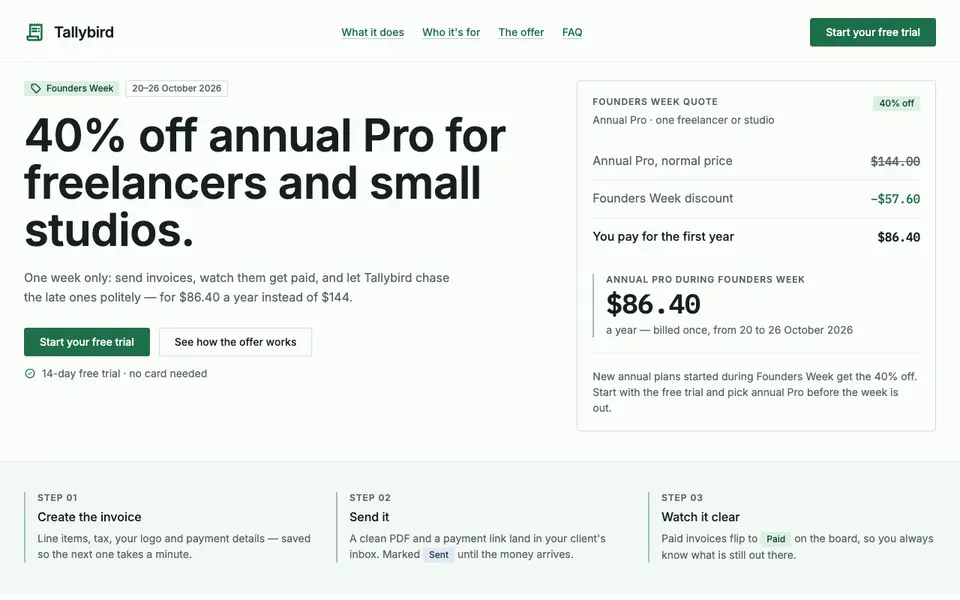
For a one-off promotion or event, the same outline works with block 4 carrying the dates and terms. When the action is a sign-up rather than a purchase, see how to add a lead form to a landing page.
A simple landing page template
When the visitor already knows the product — returning customers, a restock, an email to existing users — four blocks are enough:
- What it is and the offer, in one line, with the product image.
- Three reasons or details that matter for this offer.
- The terms: price, dates, delivery or trial.
- One action, repeated at the end.
Use the full templates when the visitor is new to the product or comes from an ad they clicked out of curiosity.
If you sell on Amazon or another marketplace
Sellers whose checkout is a marketplace listing use the product template in front of the listing: the landing page explains, and every button links to the listing. Two things differ:
- The listing has to match the page. Price, product name and options should be the same, or visitors stop trusting both.
- Tracking needs the marketplace’s own tools, because the sale happens on its site, not yours. Check what your marketplace offers for measuring outside traffic before you launch.
How to choose the right template
| Your situation | Template |
|---|---|
| One physical product, visitors new to it | Product landing page template |
| Software, a service or a time-limited offer | SaaS and offer template |
| Visitors who already know the product | Simple four-block template |
| Visitors who do not know they need it yet | An advertorial first — see advertorial template |
The best template is the one that answers the questions your visitors have, in the order they have them — not the one with the most sections. Leave out blocks you cannot fill with real facts.